Android APK, No Play Store Needed
Download the Spinaconda APK directly from spinaconda.app and install it without going through Google Play. Setup takes under two minutes on any Android device.
App at Spinaconda in Canada: Mobile Deposits & Withdrawals
The full Spinaconda casino in your pocket. Android APK direct from spinaconda.app, iOS PWA with one-tap home screen access, and all bonuses available on mobile.
The Full Spinaconda Casino in Your Pocket
The full Spinaconda casino in your pocket. Android APK direct from spinaconda.app, iOS PWA with one-tap home screen access, and all bonuses available on mobile.
Get the App Adults of legal age only. Gambling carries a risk of addiction. Bonus terms and conditions apply.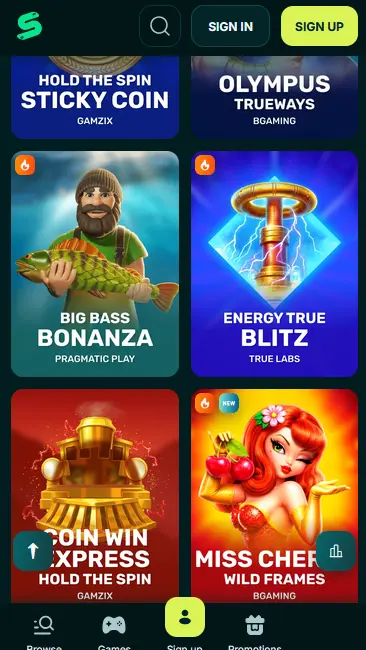
How to Get the Spinaconda App
Mobile Security Best Practices
What You Should Do
What You Should Avoid
What the Spinaconda App Delivers
Android APK, No Play Store Needed
Download the Spinaconda APK directly from spinaconda.app and install it without going through Google Play. Setup takes under two minutes on any Android device.
Instant iOS PWA Access
iPhone and iPad users add Spinaconda to their home screen as a Progressive Web App via Safari. It opens like a native app with no download size and no App Store approval needed.
SSL Encryption and 2FA on Mobile
Every session is protected by SSL encryption. Two-factor authentication works on the Android app and the iOS PWA, adding a time-limited code step at login.
Spinaconda App: Strengths and Limitations
Pros
Cons
Device Requirements
Android
iOS
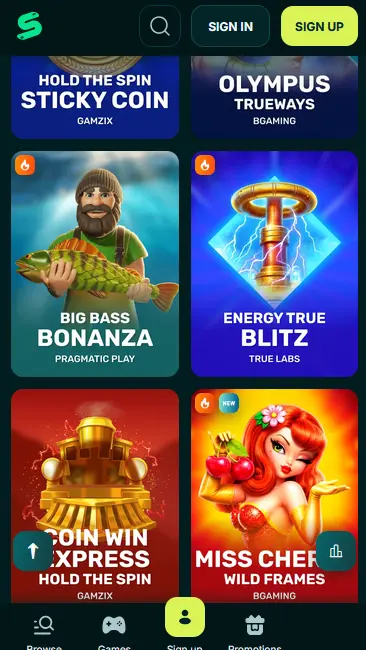
The Spinaconda mobile experience delivers the full casino catalogue in a format optimized for touchscreens. Whether you are using the Android APK or the iOS PWA, every section of the desktop site is available: the slot lobby, live casino tables, crash games, the bonus centre, cashier, and support chat. The layout scales to screen size without dropping features, so switching from desktop to mobile does not mean losing access to specific providers or game categories.
The Android APK is a native application that installs directly from spinaconda.app without requiring Google Play. It supports persistent session storage, meaning you stay logged in between visits without re-entering your credentials each time. The iOS PWA runs through Safari and, once added to the home screen, opens in a borderless full-screen view that removes the browser chrome for a cleaner interface. Both versions receive casino updates automatically when you open the app, so there is no manual update process.
The primary practical difference is installation method and session handling. The APK and PWA give faster repeat access than opening a browser tab each time. Functionally, the game catalogue, cashier limits, and bonus terms are identical across the desktop browser, the Android app, and the iOS PWA.
The mobile lobby is organized into the same categories as the desktop site, with all major providers represented. Touch controls replace mouse interactions cleanly across all game formats.
Slot games from Pragmatic Play (Gates of Olympus, RTP 96.5%; Sweet Bonanza, RTP 96.47%), NetEnt (Dead or Alive 2, RTP 96.8%; Starburst, RTP 96.1%; Gonzo’s Quest, RTP 95.97%), Thunderkick (Fruit Warp, RTP 97%), Play’n GO (Book of Dead, RTP 96.21%), Hacksaw Gaming, Nolimit City, Push Gaming, BGaming, and Microgaming (Mega Moolah progressive jackpot, RTP 88.12%) are all playable on mobile. Bonus-buy functionality and autoplay work on touchscreens with the same options available on desktop.
Evolution Gaming’s live studio stream adapts to mobile screens without noticeable quality loss on a standard 4G or Wi-Fi connection. Lightning Roulette, Crazy Time, Infinite Blackjack, Monopoly Live, and Deal or No Deal Live all run in the app. Pragmatic Live contributes Speed Baccarat and One Blackjack. Betting limits on mobile are identical to the desktop tables, so high-roller play is available on the go.
RNG table games (blackjack, roulette, baccarat variants) and progressive jackpot slots including Divine Fortune (NetEnt, RTP 96.59%) are accessible in the mobile lobby. Aviator by Spribe (RTP 97%) in the Crash Games section is fully mobile-optimized and supports the in-round bet mechanics via touch.
The installation path depends on whether you are on Android or iOS.
Go to spinaconda.app in your Android browser. Locate the APK download section, download the file, and before opening it enable installations from Unknown Sources in your device’s security settings. Tap the APK file once the download completes, approve any permission prompts, and the casino app installs directly to your device. Opening it brings you to the sign-in screen.
Open Safari on your iPhone or iPad and navigate to spinaconda.app. Tap the Share icon and select Add to Home Screen from the share sheet. The PWA shortcut appears on your home screen immediately. Tap it to open the casino in a full-screen layout. No file download is required, and the PWA does not consume significant device storage.
If you use Chrome or Firefox on Android rather than the native APK, you can also add a PWA shortcut from those browsers. Open spinaconda.app, tap the browser’s menu, and look for an Add to Home Screen or Install App option. This method works on both Android and iOS where supported.
Spinaconda’s mobile platform is built to run on a wide range of current devices without hardware-specific requirements beyond what a standard smartphone already provides.
Android 6.0 (Marshmallow) or later is recommended for reliable APK performance. The overwhelming majority of Android devices in active use today meet this requirement. Older versions may install the APK but could experience slower load times for high-resolution slot content.
iOS 13 or later is recommended for the PWA. This covers all iPhones from the iPhone 6s onwards when updated to iOS 13. Face ID and Touch ID biometric login through your iOS device’s native lock screen are supported as a device-level security layer, though Spinaconda’s own 2FA operates independently through your authenticator app.
| Platform | Install Method | Minimum OS | Stores |
|---|---|---|---|
| Android | APK from spinaconda.app | Android 6.0+ | Not on Google Play |
| iOS | PWA via Safari | iOS 13+ | Not on App Store |
Spinaconda’s mobile platform applies the same security architecture as the desktop site. All data in transit is encrypted with SSL, covering login credentials, payment information, and session tokens. The casino does not store full card details on its servers.
SSL encryption protects every request between the app or PWA and Spinaconda’s servers. This applies during login, gameplay, deposits, and withdrawal requests. The encryption standard is the same protocol used by major Canadian financial institutions.
2FA can be activated from the account Security section. Once enabled, every login (including mobile sessions) requires a six-digit code generated by your authenticator app in addition to your password. This is the most effective individual protection against unauthorized account access.
While Spinaconda does not have a proprietary biometric login system, your device’s biometric unlock (Android fingerprint, iOS Face ID or Touch ID) protects the device itself. Combining device biometrics with Spinaconda’s 2FA gives two independent security checkpoints before anyone can reach your balance.
The mobile cashier mirrors the desktop cashier in full. No payment methods are limited to desktop only.
Visa, Mastercard, Paysafecard, Revolut, Skrill, Neteller, bank transfer, Bitcoin (BTC), Litecoin (LTC), and Ethereum (ETH) are all accessible through the mobile cashier. There is no Interac e-Transfer option; Canadian players depositing from a bank account should use Visa or Mastercard debit, bank transfer, or a cryptocurrency wallet.
| Method | Deposit Speed | Withdrawal Speed |
|---|---|---|
| Visa / Mastercard | Instant | 23-47 hours |
| Bank Transfer | Instant to same day | 23-47 hours |
| Bitcoin (BTC) | Instant (blockchain) | Under 1 hour |
| Litecoin (LTC) | Instant (blockchain) | Under 1 hour |
| Ethereum (ETH) | Instant (blockchain) | Under 1 hour |
The mobile cashier uses the same SSL-encrypted connection as desktop. Crypto transactions are processed on-chain, providing a transparent and immutable record. Card transactions go through the casino’s PCI-compliant payment processor. The first withdrawal from your account requires KYC identity verification before funds are released.
New players can register directly through the Android app or the iOS PWA. Tap Sign Up on the opening screen, enter your email address and a strong password, fill in your date of birth, country, and basic personal details, agree to the terms, and submit. Confirmation arrives by email within minutes. The full account with access to the bonus system is active as soon as email confirmation is complete. You must be 19 or older to register (18 or older in Alberta, Manitoba and Quebec).
Returning players tap Sign In on the app or PWA home screen and enter their registered email and password. If 2FA is active, the six-digit code is required at this step. The Android APK can store your session so that repeat logins require only a tap. The iOS PWA does not persist sessions by default, so you may need to re-enter credentials after a period of inactivity. For a detailed troubleshooting guide on login issues, see the Spinaconda login page.
The 380% welcome package (up to $10,000 in bonus funds and 400 free spins) is fully claimable through the mobile cashier. There is no restriction on which device you use to make the qualifying deposit. First deposit: 120% up to $3,000 + 300 FS. Second deposit: 80% up to $1,350 + 50 FS. Third deposit: 150% up to $1,800 + 50 FS. All carry a 35x wagering requirement. Full bonus terms are on the Spinaconda bonus page. Requires players to be 19 or older (18 or older in Alberta, Manitoba and Quebec).
Live chat is accessible from the menu in the Android app and the iOS PWA, connecting you directly to a support agent 24 hours a day, seven days a week. Email support is available at [email protected] for non-urgent queries, account verification questions, and payment disputes. Both channels cover all Canadian time zones, from Pacific Time through to Atlantic Time, with no scheduled downtime.
Players can set deposit limits, loss limits, session time reminders, and self-exclusion periods through the Account section of the app. These tools work identically on mobile and desktop. If you feel your gambling is becoming problematic, contact the support team via live chat at any time, or reach out to a Canadian responsible gambling organization for independent support.
App Questions Answered
Yes. The APK hosted on spinaconda.app is the official version. Always confirm you are on the correct URL before downloading, and avoid third-party sources that may distribute modified files.
iOS 13 or later is recommended for reliable PWA performance. Devices running iOS 12 may load the site but could experience limitations with some game features and push notifications.
Yes. All bonuses available on the desktop site, including the 380% welcome package up to $10,000 and the weekly Friday Reload, are fully claimable and playable through the Android app and the iOS PWA.
Yes. The mobile cashier supports all the same payment methods as the desktop site, including Visa, Mastercard, Paysafecard, Revolut, Skrill, Neteller, bank transfer, Bitcoin, Litecoin, and Ethereum.
Download the Spinaconda App and Play on the Go
Grab 380% up to $10,000 and 400 free spins.
Enter the Casino Adults of legal age only. Gambling carries a risk of addiction. Bonus terms and conditions apply.